How to format your LinkedIn posts (2026 Guide)

Although LinkedIn doesn't offer bold, italics, or styles when creating a post, there are ways to achieve it.
This allows us to add titles, structure the reading of a long post, or simply stand out in the feed.
Since LinkedIn lacks the tools to apply styles, the solution is to create the text with another application that does have those tools.
But not just any application. If you write in a classic word processor, like Microsoft Word or Google Docs, and copy and paste it into LinkedIn… the style is lost. This happens because LinkedIn destroys the formatting instructions those programs pass to it.
The solution is to write with an application, like the FlowStyler Editor available for free below, which applies special styles to the text that LinkedIn cannot break or erase when pasting.
FlowStyler Editor: create styled text for LinkedIn
What do styled posts look like on LinkedIn?
You have probably come across styled posts on LinkedIn more than once. They are much more common than they seem. The secret is to use styles sparingly: LinkedIn is a professional network, and it is best to use just enough to structure the text, without trying to dazzle by deploying every trick.
These are some real posts on LinkedIn. The one announcing FlowStyler uses an unusual amount of styles as a technical showcase of some things the application allows:
How does FlowStyler make styles work on LinkedIn?
Classic word processors incorporate style as a separate layer from the text. For these processors, the text would be like a series of wooden letters. And the style, a color applied like a coat of paint. Paint that can be “wiped off”.
In the same way, LinkedIn and other sites separate and discard styles applied to text as an addition.
What FlowStyler does is incorporate the style as an inseparable part of the text. For FlowStyler, styled text would be like a series of solid plastic letters in the specified color. The style cannot be “wiped off”: it is part of the letters.
The Unicode styles: styles as part of the letter
Unicode is the system computers use to represent text. In the Unicode system, all letters from A to Z, all numbers, as well as all characters from other writing systems, like Chinese, are available.
And besides that, it defines sets of mathematical characters. Originally reserved for scientific use, these are letters that look like normal letters with style. They are letters where the style… is part of the letter rather than an addition.
FlowStyler works like a word processor: when using it, it seems like the letters are “normal letters” with styles that can be applied and removed. It feels as comfortable and familiar as a conventional word processor. To achieve this, FlowStyler implements a translation layer transparent to the user, making it the first word processor with native support for Unicode styles.
Since the styles are part of the letters, what FlowStyler produces is technically considered “plain text” (that is, without a separate style layer).
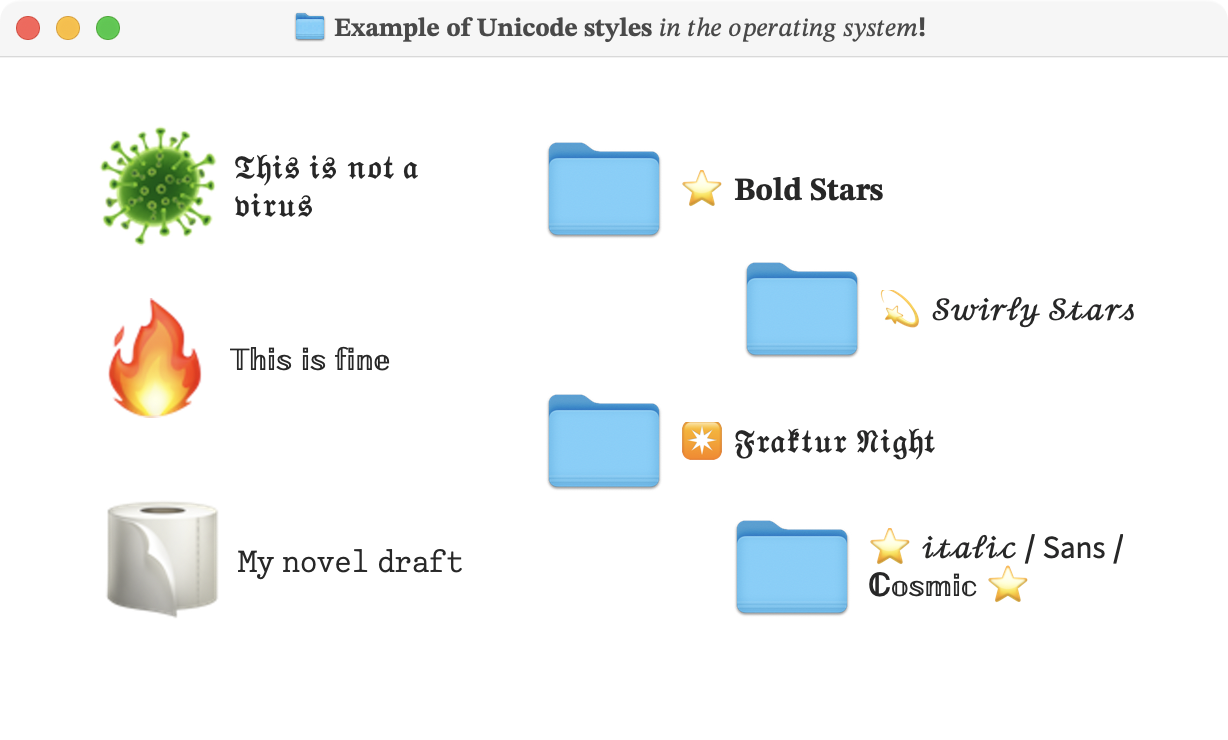
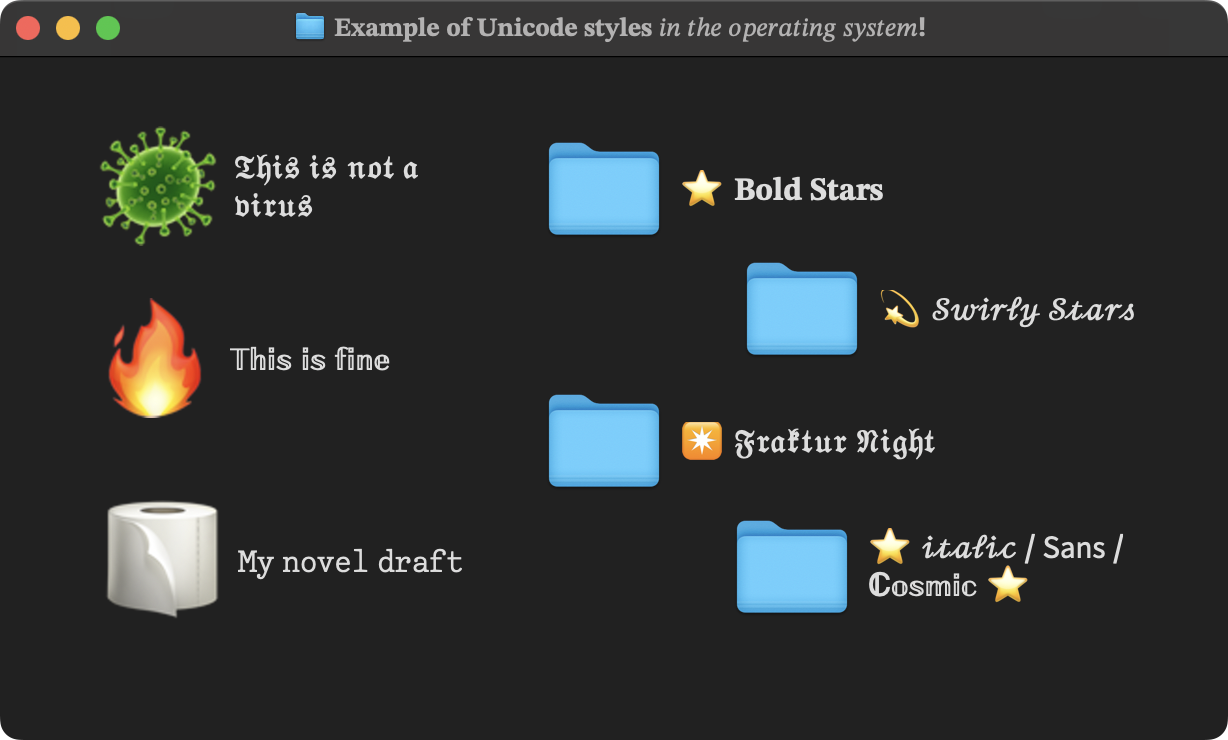
And because of that, they work on any site or application that accepts text… even in operating system file and folder names!
The evolution of Unicode styling tools
The different tools for generating styles in “plain text” are not all the same. They are differentiated and classified into major technological and evolutionary milestones: Character Maps, Generators, Formatters, and starting in 2026, the new category: the word processor for Unicode styles.
| Category | Year | Allows mixing styles | Supports accents | Can continue editing |
|---|---|---|---|---|
| Character Map | 2001 | No | Partial | No |
| Generator | 2008 | No | Generally no | No |
| Formatter | 2015 | Partial | Partial | Limited |
| Unicode Processor | 2026 | Yes | Yes | Yes |
0. Character Maps
A character map is not intended for composing text, but for locating a single special character: an emoji, a symbol.
The Unicode standard (specifically the Unicode 3.1 specification released in 2001) incorporates a block called Mathematical Alphanumeric Symbols. These are characters created exclusively for scientific formulas, where a letter 𝐅 represents a mathematical vector and not a common letter with visual style.
𝐅 = q (𝐄 + 𝐯 × 𝐁)
Although cumbersome, it is perfectly possible to pick mathematical characters one by one from a character map. This process was progressively automated by the tools that appeared next.
1. Unicode Font Generators
Generators were the first technological wave to apply Unicode styles to plain text. Their appearance dates back between 2008 and 2010, driven by the use of Twitter and Instagram. By mutating the standard ASCII alphabet for these blocks, the first "fancy text" websites were born.
Generators are extremely easy-to-use, simple, and limited tools that take your text and convert it entirely to a single style chosen from a list.
They are useful for very simple cases. For example, if you just want to see how your name or a phrase looks in all possible Unicode typography to quickly pick a design:
For more complex cases, where different styles are needed in different parts of the text, these tools force you to do real masonry work: you have to convert the title, copy it, paste it into LinkedIn, return to the generator, write the other phrase, convert it, copy it, and paste it again. It's a fragmented back-and-forth flow.
Another limitation is that the vast majority of generators completely lack support for accents: since the 2001 mathematical symbols were designed for Anglo-Saxon science, they do not have diacritics. When processing words like "conversión", generators either remove the accent (𝗰𝗼𝗻𝘃𝗲𝗿𝘀𝗶𝗼𝗻) or ignore the character leaving the original (𝗰𝗼𝗻𝘃𝗲𝗿𝘀𝗶ó𝗻).
2. Text Formatters (Post Formatters)
Formatters represent the second evolutionary wave of these tools. They were born to mitigate the friction of generators, offering a single elastic input box that emulates the experience of a classic web editor.
These are tools that allow writing long text inside a box, selecting specific words or phrases with the cursor, and applying an individual style to them without altering the rest of the content.
They are notably more advanced than generators. Allowing selective formatting means that putting together a post with a highlighted title and a normal body no longer requires multiple copy-and-paste trips.
However, they are not without limitations. Although they solve fragmented copy-pasting, traditional Formatters crash head-on into the hard physics of Unicode.
Because they do not operate with elastic word processing logic, but with direct character replacement, styles cannot be combined. If you have a phrase in italics (𝘲𝘶𝘦) and select a word to make it bold, the formatter deletes the italics and applies regular bold (𝗾𝘂𝗲), instead of transforming it to bold-italic. For combined styles, they offer separate physical buttons ("Bold Italic"), breaking the familiar experience of editing text with styles.
They also tend to inherit accent limitations, replacing accented letters with their plain equivalent (𝗣𝗮𝗿𝗶𝘀) or ignoring the "problematic" character (𝗣𝗮𝗿í𝘀).
The workflow of formatters is usually linear and irreversible: they force you to write everything in clean plain text, then meticulously select to format, and finally copy. Once the text has style applied, typing over it applies unstyled text, so correcting a word or phrase ends up involving retyping everything, selecting, and applying styles again.
3. Word Processors with Native Support for Unicode Styles
The most recent category appeared in 2026: word processors with native support for Unicode styles.
Unlike traditional generators and formatters, these tools are not intended as character converters. Their goal is to offer an editing experience similar to Microsoft Word, Google Docs, or Apple Pages, but producing text that retains its styles when copied and pasted into LinkedIn, Facebook, Instagram, and other platforms.
The difference completely changes the way you work.
While generators and formatters force a specific order (first write, then apply styles, finally copy), a word processor allows writing, correcting, reformatting, and reorganizing content at any time. The text no longer undergoes a series of irreversible transformations: it behaves like a document that can continue to be edited.
FlowStyler, launched in May 2026, is the first tool created specifically under this philosophy.
For example, if a phrase is already in italics and you decide it should also be bold, you simply apply bold. If you want to continue writing in the same style as text that already has formatting, you can do so without reselecting text or reapplying styles: just place the cursor at the end of the text, and write; FlowStyler takes care of the rest. If you paste an old post into the editor that already had Unicode styles, you can continue modifying it as if it were a normal document.
This way of working eliminates many of the historical limitations of generators and formatters, allowing you to focus on writing instead of fighting with the tool.
Additionally, FlowStyler incorporates full support for languages with accents and other diacritical marks. Words like "información", "conversión", "París", "perché", or "São Paulo" maintain their characters correctly even when styles are applied to them.
The result is the same user experience as using a conventional word processor. The focus shifts away from how to achieve a specific visual effect and returns to where it should be: the text we are writing.
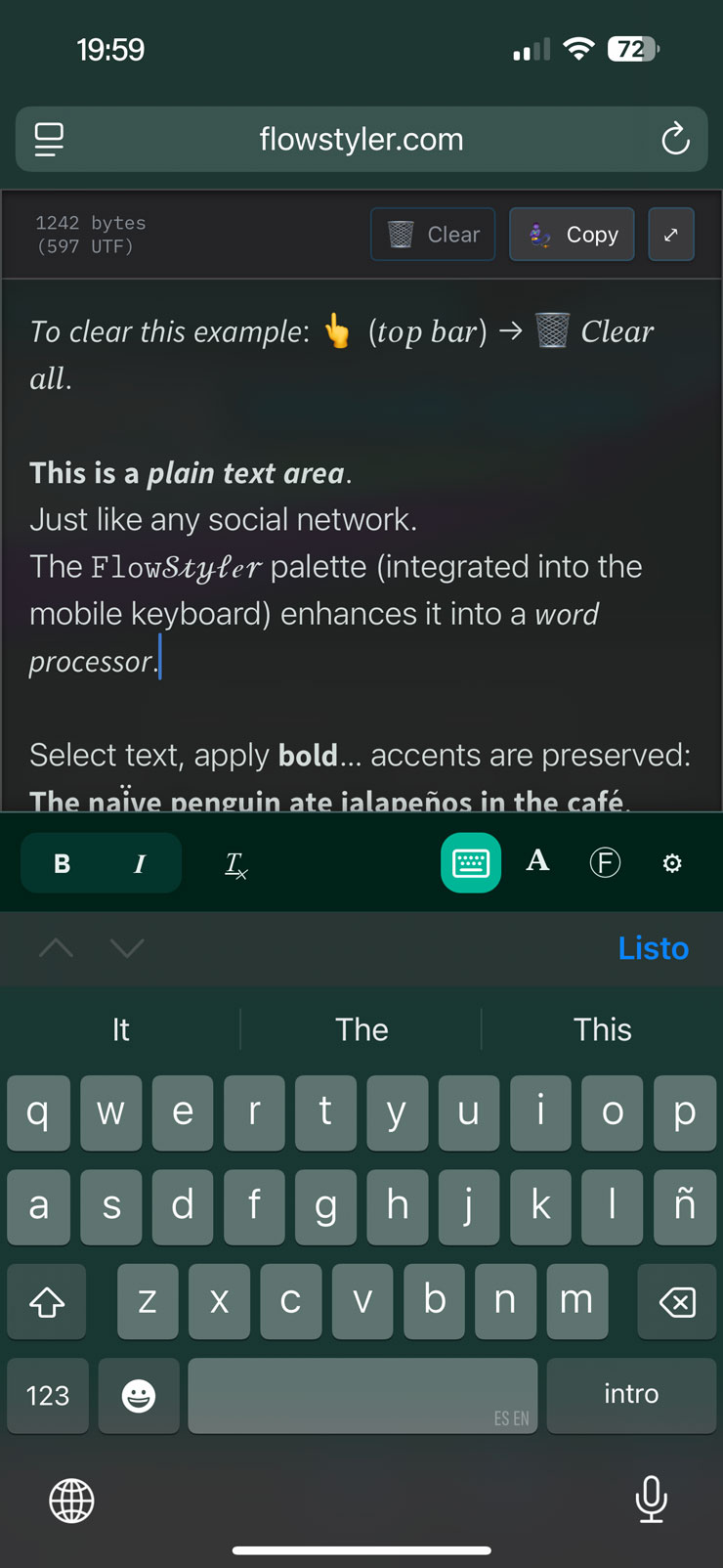
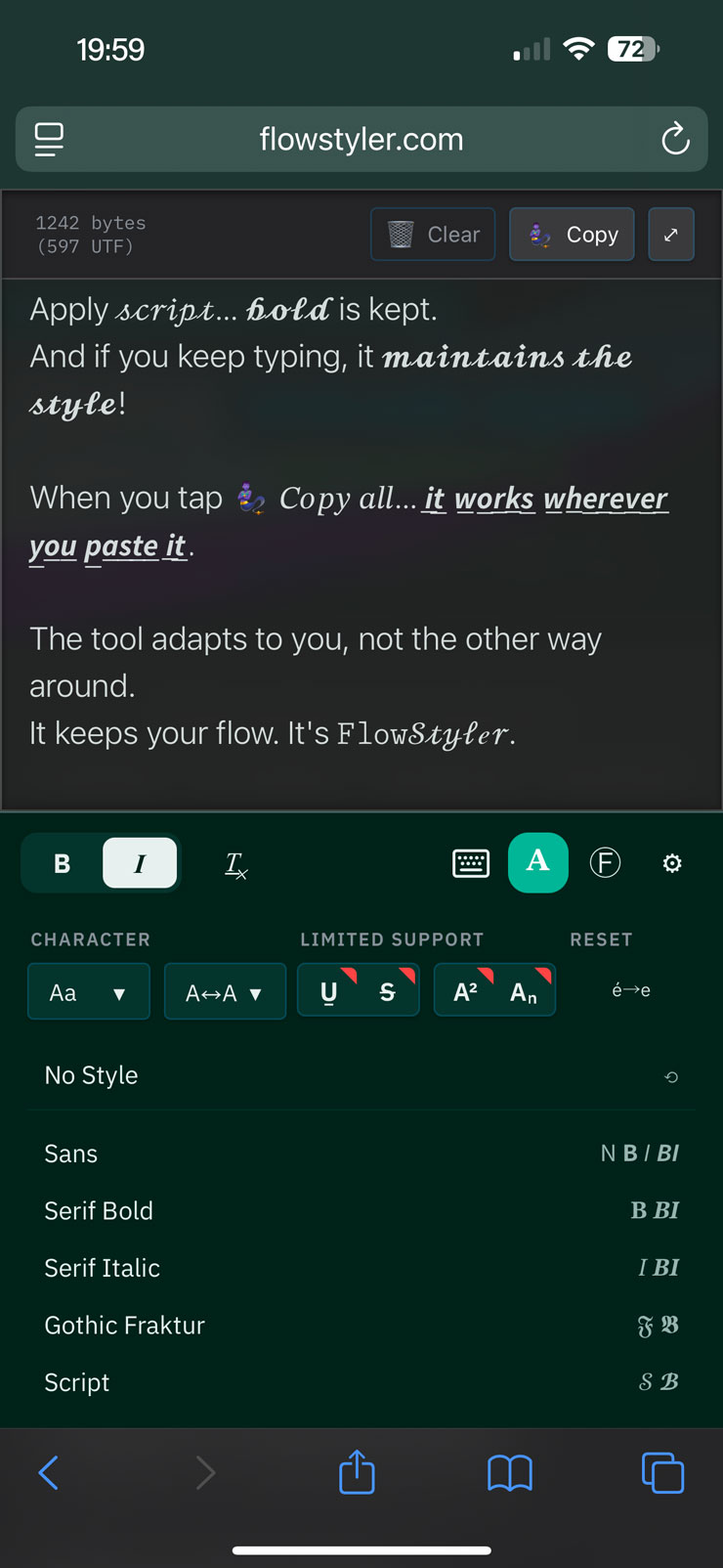
These advantages are also maintained on mobile. On iOS and Android, FlowStyler integrates its tools into the keyboard area, maintaining the conventions of native Google and Apple applications. Styles become part of the normal workflow, just as they do in traditional word processors.
FlowStyler allows combining styles, maintaining accents, reusing existing content, modifying already created posts, and continuing to write after applying formatting, both on computers and mobile devices.
Accent support
One of the historical problems with Unicode tools is the support for accented characters. Many mathematical alphabets do not include variants for:
á é í ó ú
à è ì ò ù
â ê î ô û
ã õ
ä ë ï ö ü
FlowStyler reconstructs these characters using equivalent Unicode combinations, allowing work with languages that use diacritics. Among them: Spanish, Italian, French, Portuguese, German… and many others.
Live styles
Most tools work in two steps: Write, and Apply format.
FlowStyler introduces a different model. Once a style is applied, it is possible to continue writing in that same style. This eliminates the need to continuously select text to reapply formatting after every modification.
The result is much closer to the experience of using a traditional word processor.
Mobile device usage
Most Unicode tools were originally designed for desktop. On mobile devices, they usually rely on external toolbars that compete for space with the content.
FlowStyler integrates its tools directly around the input area and adapts its interface to the mobile experience. This allows writing, editing, and applying styles without leaving the writing flow.
Limitations of Unicode styles
Unicode styles are an extremely practical solution for publishing text with bold, italics, and other visual effects on LinkedIn, Facebook, Instagram, and other platforms that do not incorporate their own formatting tools.
However, they are not a perfect solution. Like any technology, they have limitations that are worth knowing.
The main limitation of Unicode styles is that they depend on the support each platform has for these special characters. In modern applications, this usually works without issues, but the final result may vary. This happens because Unicode styles are not real bold or italics, but different characters that visually resemble them. This characteristic is precisely what allows them to survive copying and pasting between applications, but it also explains some of their peculiarities. They work where formatting support does not exist, but they can be problematic or cause confusion in environments that do have such support.
Another limitation is that the final appearance always depends on the platform where the text is viewed. LinkedIn, Facebook, X, Instagram, iOS, Android, Windows, or macOS may show slight visual differences from each other. In practice, the results are usually very similar, but there is no absolute guarantee of uniformity across all systems.
There is also an inherent limitation to the Unicode standard itself: not all styles have all possible variants. Some sets include normal, bold, italic, and bold-italic versions. Others only offer one or two variants. This is not a limitation of FlowStyler or any particular tool, but of the characters defined by the Unicode standard.
Languages with accents represent another special case. Many of the mathematical alphabets upon which Unicode styles are built were originally designed for scientific publications in English and do not incorporate accented characters. For this reason, numerous generators and formatters remove accents, replace them with unaccented letters, or simply leave the original characters unmodified.
FlowStyler solves this problem by reconstructing accented characters through equivalent Unicode combinations. Thanks to this, languages like Spanish, French, Italian, Portuguese, or German can be used normally without losing accents or diacritical marks.
Finally, there are some edge cases where different internal Unicode mechanisms conflict with each other. Certain combinations of styles, underlines, strikethroughs, or diacritical marks may display imperfectly in specific applications or in fonts with incomplete support. When this happens, the limitation no longer belongs to the tool used but to the way each system interprets and represents those characters. For these cases, the only options are to remove the style… or remove the accents.
Despite these restrictions, Unicode styles remain today the only universal way to incorporate visual emphasis into texts that must work consistently when copied and pasted between different platforms.
What is the best way to style text on LinkedIn in 2026?
Today, the best way to format your posts is by using a word processor with native support for Unicode styles, like FlowStyler. This category leaves behind the methods of generators and formatters that emerged in past decades.
By operating under the philosophy of a word processor and not as a simple character converter, using FlowStyler is completely intuitive: it allows your attention to be 100% on what you want to say, rather than fighting with the tool's limitations.
Since FlowStyler is free and works in any modern desktop or mobile browser, there is currently no reason to use another tool in your workflow.
})